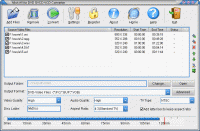
Allok AVI to DVD SVCD VCD Converter is a powerful tool to convert AVI, DivX, XviD, MPEG, VOB, DAT, WMV, ASF to DVD, SVCD, VCD format that can be played on your VCD/DVD player.
Allok AVI to DVD SVCD VCD Converter is a powerful tool to convert AVI, DivX, XviD, MPEG, VOB, DAT, WMV, ASF to DVD, SVCD, VCD format that can be played on your VCD/DVD player. Integrated High-speed MPEG encoder which let you make DVD-Video files(VIDEO_TS, AUDIO_TS) and VCD/SVCD image(*.bin,*.cue), so you can burn VCD/SVCD/DVD disc easily by using third-party burning tools.The main features include: add subtitle onto your output movie, adjust 4:3 or 16:9 video aspect, adjust output video quality, all encoders/codec are built-in and any supported conversion can be done once you downloading the software. It's very easy to use and fast with high quality.
Key Features:
Supports AVI, DivX, XviD, MPEG, WMV, ASF to VCD,SVCD,DVD compatible MPEG format
Supports AVI, DivX, XviD, MPEG, WMV, ASF to VCD SVCD image(*.BIN,*.CUE) and DVD-Video files(*.IFO,*.VOB,*.BUP)
Batch files conversion
Output size adjustment, output quality adjustment
Cut unwanted parts by specifying start time and end time
Add subtitle onto the output video
All encoders/codec are built-in and any supported conversion can be done once you downloading the software
NTSC/PAL setting options for DVD, VCD, SVCD exporting
Support "Drag and Drop" from Windows Explorer
Custom define the output audio volume.
Add letterbox to keep the original aspect ratio
Support large video file, even large then 2GB
Fast conversion speeds and high quality
Simple GUI and very EASY to use
Lifetime FREE Technical Support and FREE upgrade . Free trial download.30 day money back guarantee
Whats new in version 4.0.0529:
AVI to DVD SVCD VCD Converter updated
Requirements:
windows system
Operating system:
Win2000,Win7 x32,Win7 x64,Win98,WinVista,WinVista x64,WinXP
Release notes:
Major Update

DVD Catalyst rips your DVD movies fast and easy to PSP iPod iPhone Zen Zune Cowon Nokia Motorola Blackberry Omnia HTC and more. Also converts video files, and supports Batch, Black bar removal, new free booster pack available on our website
Price: $24.95, Rating: 10, Downloads: 184
Download

Copy your DVD movies without losing quality. You can make backup copies of your DVD movies and watch it on your DVD Player! With its superior kernel, DVD XCopy Deluxe can backup your entire DVD movie.
Price: $59.95, Rating: 7, Downloads: 174
Download
Watch video On Demand from around the globe while surfing the Web. Browse from over 1.7 Million Videos from 100?s of Categories. Watch video as you surf the web (Word-processing, Email etc). 1000?s of videos Searched Daily.
Price: $, Rating: 9, Downloads: 163
Download 
 Allok AVI to DVD SVCD VCD Converter 4.0.0529 details